What the symptom “sound but no picture” means
This phrase can cover several different situations:
- the screen is completely dark, but sound works;
- the screen flashes for a second and then goes black;
- the screen glows gray or is slightly lit, but there is no image;
- stripes, half an image, or distortion are visible;
- the picture is very dark and only visible under external light;
- The TV shows the logo, and then the picture disappears.
These options correspond to different diagnostic branches. A completely dark screen with a faint image visible under a flashlight points more strongly to the backlight circuit. A uniformly lit screen with no image suggests checking the video path. Stripes and half of the image are more associated with the T-CON, the panel interface, or the panel itself. The main rule: A symptom is an observation, not a diagnosis..
Where to start without disassembly
Make sure the TV actually works
Check whether the volume changes, whether the TV responds to the remote, whether inputs switch, and whether system sounds are audible. If the sound is stable and the TV follows commands, that part of the system does work. But this does not prove the Main Board is fully functional. The system board may produce sound while also having a problem in the video path or backlight control.
Look at the screen in a dark room
Turn off bright lighting and turn on the TV. There are three possible scenarios:
- 1. The screen is completely black and does not change. The backlight may not start.
- 2. The screen brightens for a moment and then goes dark again. The backlight may attempt to start, followed by protective shutdown.
- 3. The screen is noticeably lit, but there is no picture. There is light, so the cause needs to be investigated further along the video path.
Perform the flashlight test
- 1. Turn on the TV and wait until you hear sound.
- 2. Start playing content where the picture is definitely supposed to change.
- 3. Hold a regular flashlight or your phone’s flashlight up to the screen at a slight angle.
- 4. Slowly move the beam across the surface.
- 5. Look for very faint outlines of the moving image.
If silhouettes or movement are visible under the beam, it is a strong sign that the LCD layer is forming the picture while the backlight is missing or too weak. Do not press on the screen, tap the chassis, or try to light the panel from the inside.
If the image is visible under a flashlight
This is the most typical scenario for backlight problems, but there are several possible causes within this group.
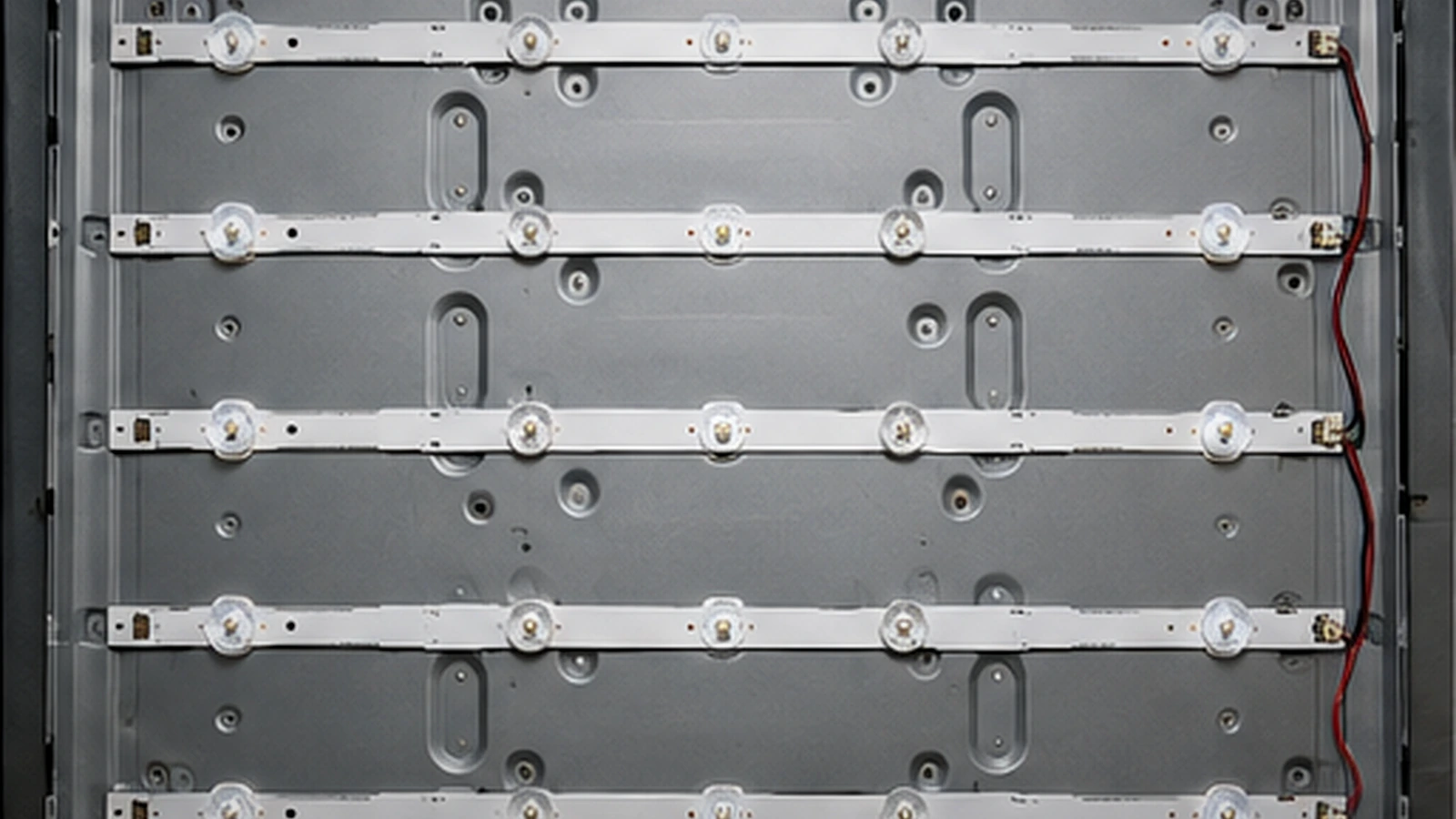
LED strips and LEDs
In LCD/LED TVs, the liquid crystal panel forms the image, and LED backlighting makes it visible. If some LEDs degrade or the circuit breaks, the driver may shut off the backlight entirely. Externally, this often looks like this: there is sound, the screen is black, the picture is only visible under a flashlight, and sometimes a brief flash occurs before shutdown. Without disassembly, it’s impossible to determine whether a single LED, several strips, or the connection between them is faulty.
LED Driver
The LED driver generates the backlight current and controls its operation. In different models, it can be part of the power supply or a separate unit. Therefore, a positive flashlight test does not automatically mean that the LED strips need to be replaced. The fault may be in the driver itself, its power stage, feedback, or control signals.
Power supply
If backlight power is generated in the PSU, a power supply fault can result in failure to start, shutdown after startup, or unstable operation. Measurements in this section relate to service diagnostics: dangerous mains circuits are present inside, and some components may retain a charge after the TV is disconnected.
Control from the Main Board
The Main Board may participate in starting and regulating the backlight. Therefore, professional diagnostics checks not only the LEDs but also the driver power supply, startup commands, and protection operation.
If the screen is lit but there is no picture
When the screen is clearly backlit but there is no image, the task changes: light is present, but video data is not reaching the panel or is not being processed correctly. Possible components:
- Main Board;
- T-CON;
- interface between the Main Board and the panel;
- panel power supply;
- the matrix itself and its drivers.
Main Board
The main board processes input signals and generates the video stream. In case of a partial fault, the TV may power on, produce sound, and respond to the remote control, but fail to deliver a correct image.
T-CON
T-CON, or timing controller, is involved in transferring data to the panel and generating the panel’s timing signals. In some TVs it’s a separate board; in others, its functions are integrated. Problems with this component can appear as a backlit screen with no picture, a white or gray screen, stripes, half the image, or severe distortion. Specific voltages and test points depend on the panel model and circuit. There are no universal ratings for any T-CON.
Panel interface
Damage to the ribbon cable, connector, or high-speed interface can result in no image or a distorted image. Without opening the case, it is usually impossible to reliably distinguish this scenario from a T-CON or Main Board failure.
When the panel is more likely the problem
The panel is the most expensive and fragile component of the TV, but the “no image” symptom alone is not grounds to immediately blame the panel. The following signs more often point to a problem with the panel or its peripheral drivers:
- persistent vertical or horizontal lines;
- one half of the screen works, the other doesn’t;
- colored stripes;
- cracks and impact marks;
- areas of the image break apart or duplicate;
- the image changes when the casing is deformed.
Even such signs require confirmation: similar defects occur in the T-CON, ribbon cables, and panel power supply. DIY attempts to press, heat, or “repair” COF/TAB connections along the panel edges are especially dangerous. These components are very fragile and can be damaged irreversibly.
How to tell backlight, matrix, and board apart by external signs
- The screen is dark, but the image is visible under a flashlight: Backlight, LED Driver, PSU, backlight control; does not prove: that the LED strips are faulty
- The screen briefly flashes and goes out: LED circuit, driver, protection; does not prove: that the problem is only in one LED
- The screen is backlit, but there is no picture: Main board, T-CON, interface, panel power supply, matrix; does not prove: That the matrix itself is at fault
- Stripes or half of the image: T-CON, panel interface, matrix; does not prove: That the panel definitely needs replacement
- There is sound and response to the remote control: The system is partially operational; does not prove: That the main board is fully functional
What you can safely check at home
Without opening the casing, it’s reasonable to limit yourself to the following steps:
- 1. Unplug the TV from the power outlet for a few minutes and plug it back in.
- 2. Check a different signal source.
- 3. Open the menu or change the volume.
- 4. Inspect the screen for cracks, impact marks, or liquid damage.
- 5. Check if the screen glows in a dark room.
- 6. Perform a flashlight test.
- 7. Note the behavior when turning on: flash, delay, lines, brightness changes.
- 8. Take a short video of the symptom if the fault occurs intermittently.
What not to do without equipment and experience
Don’t try the following on your own:
- opening the power supply and measuring the mains section;
- applying random external voltage to LED strips;
- shorting the driver’s control pins;
- unplugging the panel cables “one by one” without understanding the circuit;
- heating the T-CON, main board, or COF/TAB;
- pressing the edges of the matrix;
- performing BGA soldering or memory programming;
- disassembling the LCD panel to access the backlight without experience.
Replacing the backlight often requires full panel disassembly: removing the matrix, diffusers, and optical layers. For large diagonal sizes, this is one of the riskiest mechanical operations.
How professional diagnostics works
1. Symptom confirmation
The sound, response to controls, presence of backlight, behavior at startup, presence of an image under external light, and the nature of distortions are checked.
2. Separating the backlight and the video path
If an image is visible under a flashlight, the main focus shifts to the backlight and its power supply. If the backlight works but there is no image, the Main Board, interface, T-CON, panel power, and the panel itself are checked.
3. Measurements under load
For power supply circuits, not only the presence of voltage matters. A power supply may output it without load but sag during startup. Similarly, an LED driver is evaluated based on load behavior and protection, not by a single measurement.
4. Confirming the specific module
Only after checks is a conclusion made whether the fault lies in the LED strips, LED driver, PSU, main board, T-CON, panel interface, or the panel itself.
Common mistakes
“If there is sound, the main board is fine.”
No. The board can perform some functions while also having a fault in the video path or backlight control.
“If a flashlight reveals a picture, the backlight needs to be replaced.”
Not necessarily. The cause could be in the LED strips, driver, power supply, or control signals.
“If the screen is lit, the panel is broken.”
No. The Main Board, T-CON, interfaces, and panel power supply can cause similar symptoms.
“If the screen flashed, the backlight is working.”
A short flash means only a startup attempt. After that, the protection may have cut off the circuit.
“Stripes always mean the panel needs replacing”
Not always. Stripes can be related to the T-CON, ribbon cables, and panel power supply.
When repair usually makes sense
Economic viability depends on the screen size, panel type, TV age, parts cost, and the nature of the defect. In general terms:
- backlight failure is often repairable;
- PSU, LED driver, and main board can often be repaired or replaced;
- a separate T-CON is usually more economical if it is designed as a replaceable module;
- a physically damaged panel often makes repair uneconomical;
- COF/TAB defects require case-by-case assessment and do not always have a reliable solution.
Don’t buy parts until the cause is confirmed.
Conclusion
When a TV has sound but no picture, the right approach is not to guess which component is faulty, but to break the symptom down into testable scenarios. A dark screen with a faint image visible under a flashlight points more to a backlight issue or its control circuitry. A lit screen with no image shifts attention to the video path — the main board, T-CON, panel interface, and the matrix. Without disassembly, the user can safely check the TV’s response, whether the screen glows, and perform the flashlight test. Anything involving the mains section, measurements inside the PSU, panel disassembly, COF/TAB, or soldering is best left to professional diagnosis. TV Repair specialists can run diagnostics, identify the cause of the fault, and suggest the appropriate repair or service option. Related pages: