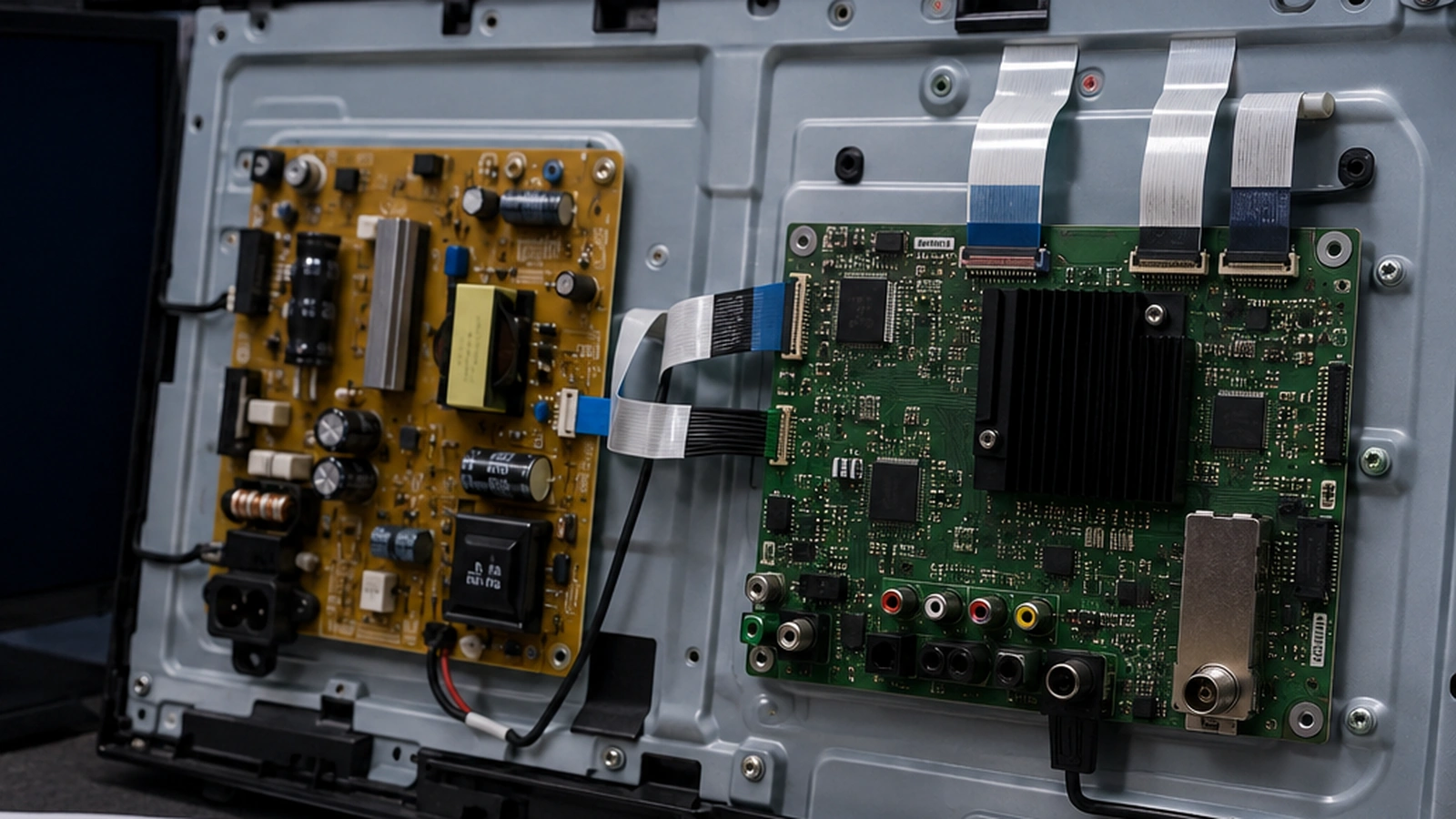
Sometimes the complaint “the TV doesn’t see the flash drive” looks like a software issue: file system, Android TV, media player, or an incompatible drive. But in actual repair, the cause can turn out to be far simpler — the USB port has no 5 V power due to a fault in the VBUS circuit.
In this case, a 75-inch Nikai TV running Android was brought in for repair. The exact TV model, Android version, and RAM capacity were not recorded, so attributing a specific Android 8/9 or 1 GB of RAM to the unit would be incorrect. That wasn’t needed for the diagnosis either: the fault was in the hardware USB power supply circuit.
The main takeaway from this case: if a TV doesn’t respond at all to known-good USB drives, before attempting a firmware update or factory reset, it’s worth checking whether the USB port itself is receiving power and whether its protection circuit is intact.
Original symptom
The complaint was simple: the TV wouldn’t recognize a USB flash drive. The drive wasn’t detected, so the first step was to divide the possible causes into several groups:
- a problem with the specific flash drive or its file system;
- a software issue with Android TV;
- a fault in the USB port or its contacts;
- missing 5 V power on the USB VBUS line;
- damage to protection components or power switching elements;
- USB interface fault on the Main Board.
The symptom “doesn’t see the flash drive” by itself doesn’t immediately reveal which component is at fault. Diagnostics should proceed from observation to measurement.
How the power supply of a typical TV USB port is arranged
A classic USB port transmits more than just data. It also has a separate power line, VBUS. For USB 2.0, this is a nominal 5-volt bus that can power a connected device.
On a TV mainboard, power is usually not fed to the connector completely “directly.” The exact design depends on the manufacturer and the board, but between the power source and the USB port there may be:
- a jumper or 0-ohm resistor;
- a fuse element;
- an electronic power distribution switch;
- a current limiter;
- filter components;
- electrostatic discharge and overvoltage protection.
Therefore, the absence of 5 V on USB does not necessarily indicate a faulty processor or Android. Sometimes the damage is located just a few millimeters from the connector.
Important: you should not assume that all inexpensive or Chinese main boards are built the same. The architecture is indeed often similar in functional logic, but the protection components, ratings, and placement of elements differ. A specific board must be checked according to its actual layout and measurements.
What was found in this Nikai
Inspection revealed that the problem was in the USB power supply circuit. The board had a very small SMD component with 0 Ω resistance connected in series in the corresponding line. It turned out to be open.
In everyday parlance, such a component is sometimes called a “fuse,” especially if it is the one that breaks the circuit under overload. Technically, however, a 0 Ω resistor and a dedicated fuse are not the same thing. Without the board schematic or component marking, it is more accurate to refer to a 0-ohm jumper/resistor in the USB power circuit., which turned out to be damaged in this unit.
After restoring this circuit, USB power returned, and the TV started working normally with the drive again.
The component was very small, but its package was not measured. Therefore, values like “1–2 microns” would be technically inaccurate here: this is a miniature SMD component whose size should be determined by its package or measured rather than estimated by eye.
Why such a component can fail
The most interesting part of this case is not replacing the jumper itself, but the question of why the USB circuit gets damaged.
One possible cause is increased or pulsed loading from the external drive. Particular attention should be paid to old portable hard drives that draw power directly from USB.
Disk capacity — 2 TB, 4 TB, or some other value — does not by itself determine the current drawn. A large amount of data does not automatically mean a heavy electrical load. What matters far more is the drive’s construction, disk type, startup current, mechanical condition, USB-SATA controller, and power supply method.
When a mechanical HDD starts up, the spindle motor spins up. At that moment, the load can briefly be higher than in steady-state operation. If a particular TV has a weak USB power margin, a faulty or poorly designed drive can cause a voltage sag, trigger protection, or overload a component in the power circuit.
A standard USB 2.0 downstream port is designed to supply a limited amount of current, and a USB device must not arbitrarily demand more power than the port provides. USB-IF additionally specifies that peripherals requiring more power than the corresponding USB interface allows must be self-powered.
This does not mean that any external HDD will necessarily burn out the TV. A properly functioning USB port should have correctly designed protection. But in practice, the condition of the board, the quality of the protection implementation, and the specific characteristics of the particular external drive all matter.
Why you should check 5 V first instead of reflashing the TV
When Android TV doesn’t show a flash drive in the menu, you might be tempted to immediately look for a firmware update, reset the device, or change the file system. These actions are sometimes reasonable, but only after simple checks.
If power is physically absent on the USB port, software recovery won’t fix a broken VBUS circuit.
The diagnostic logic in this case looks like this:
- Check the storage device on another device.
- Test another known-good USB drive on the TV.
- Inspect the connector for mechanical damage and contamination.
- Check whether the TV responds to the connection at all.
- Under service conditions, verify that USB power is present.
- If there is no power, trace the VBUS circuit and locate the break or a faulty protection/switching component.
- After repair, test the port’s operation under a real but permissible load.
This order helps you avoid confusing software incompatibility with a lack of hardware power.
How to tell a power problem from a file system problem
If the flash drive is receiving power but Android TV isn’t showing it, the cause may be different. For example, the TV might not support a particular file system, or the drive might have a corrupted partition layout.
Google’s Android TV help explicitly notes that support for and handling of USB drives can vary between TVs. Therefore, formatting should not be treated as a universal first step, especially if the drive contains important data.
Signs of a hardware power issue can include a complete lack of response to several known-good USB devices. But even this isn’t a definitive diagnosis: measurement provides confirmation.
Signs of a software or file-system issue usually look different: power is present on the port, one device is recognized and another isn’t, or the system prompts you to format. In this case, you need to check the format, partitioning, compatibility, and condition of the drive itself.
Do you need to turn off the TV before connecting a USB device?
USB was originally designed for connecting and disconnecting devices without requiring the host to be fully powered off. So the rule “always plug in the flash drive first, then turn on the TV” cannot be passed off as a standard requirement or a universal safeguard against damage.
However, for an old external HDD with questionable health, unknown power draw, or an unstable USB-SATA controller, it’s wiser not to test the limits of the TV’s USB port at all. It’s safer to use a self-powered drive or a suitable powered USB hub, provided the TV supports such a configuration.
For a normal, working USB flash drive, a special power-on sequence is usually not required. More important is to avoid using damaged connectors, cables, and drives, and to properly eject the drive through the system before physically disconnecting it, when such a feature is available. Android TV Help also recommends ejecting the USB drive via software before disconnecting it to protect data.
Why old Android boards require careful diagnostics
Budget Smart TVs often run platforms with limited hardware resources. On an older Android, this can show up as sluggish menu navigation, slow app loading, and limited compatibility with modern software.
But a slow Android and a non-working USB port are different symptoms. They shouldn’t automatically be linked to the same cause.
In the Nikai in question, the Android version and RAM size were not checked. Therefore, during repair it was better not to base the diagnosis on the assumption of a “weak Android board,” but to check the electrical part of the USB. It was the measurement that revealed the damaged battery.
This is a good example of a general diagnostic principle: a platform characteristic can explain slow performance, but the absence of 5 V at the connector points to a hardware circuit issue.
What a technician should check
Checking the USB circuit on the main board is part of component-level diagnostics. After opening the TV, it is important not to limit yourself to replacing the part based on its appearance.
A professional check should answer at least the following questions:
- whether VBUS is actually absent at the connector;
- whether there is 5-volt power before the damaged section;
- whether there is a short circuit after the component;
- whether the USB connector itself is damaged;
- whether the power switch is functional, if the circuit provides for one;
- whether the connected device creates an excessive load;
- whether stable power is maintained after repair.
If a 0-ohm jumper burned out due to a short circuit, simply installing a new one without finding the cause may lead to a repeat failure. First, you need to make sure there is no abnormally low resistance or other defect behind it.
Why you shouldn’t just install “something thicker”
A damaged miniature component sometimes tempts you into a dangerous idea: to replace it with thick wire or bridge it with a jumper with plenty of current headroom.
You must not do this without understanding the circuit.
If the original component was involved in limiting the consequences of an overload, a crude jumper can transfer the damage further along the circuit — to the PCB trace, power switch, converter, or Main Board. Even if the marking reads 0 Ω, you need to consider the package type, allowable current, the intended function of the position, and the board construction.
Component-level repair of the main board requires soldering under magnification and checking for short circuits. This is a service operation, not a recommended home procedure.
Practical recommendations for TV owners
For regular USB flash drives, the risk of overloading the USB port is low if the drive and connector are in good condition. But with external drives, you should keep power in mind.
Useful rules:
- do not use a drive with a damaged USB plug or cable;
- if an external HDD starts up erratically, clicks, constantly reconnects, or disappears from the system, do not keep retrying on the TV;
- for a high-consumption drive, prefer a model with its own power supply or compatible external power;
- do not treat 2–4 TB capacity as the only risk criterion — actual power draw and compatibility matter more;
- before disconnecting the drive, use the system’s safe ejection feature if available;
- if several known-good flash drives get no response at all, don’t rush to reflash: first rule out a hardware USB problem.
Repair result
In this 75-inch Nikai, the fault turned out to be local: a damaged 0-ohm SMD component was found in the USB power circuit. After restoring the circuit, the USB port started working, and the TV was able to work with the storage drive again.
This case is useful because it shows the difference between a symptom and a diagnosis. “Android doesn’t see the flash drive” sounds like a software fault, but the actual cause may be missing 5 V power on the USB port.
Conclusion
If a Smart TV stops recognizing USB, it helps to think not only in terms of Android and file systems. A USB port is also an electrical power circuit. In the Nikai model examined, it was precisely an open circuit in a tiny 0-ohm SMD component that deprived the port of power, and restoring the circuit brought it back to life.
However, the mere use of a large external HDD does not prove the cause of failure: drive capacity and power consumption are different parameters. For preventive maintenance, it is more important to use working devices, take power requirements into account, and avoid connecting peripherals to the TV’s USB port that need more power than the port can properly provide.
TV Repair specialists can perform diagnostics, determine the cause of the malfunction, and offer a suitable repair or maintenance solution.